


The March 2026 Virbela release introduces a powerful new capability for immersive experiences: Placeable AI Agent Bots that can interact with users directly inside your virtual environment.
Alongside AI agents, this release also includes improvements to collaboration tools like Image Boards, new administrative capabilities, and performance upgrades that make the virtual experience smoother and more dynamic.
Here’s a look at what’s new.
Meet Placeable AI Agent Bots
One of the most exciting additions in this release is AI Agent Placeable Bots.
These bots can be placed anywhere within a Virbela world and configured with custom prompts that define their behavior. Once placed in a scene, users can approach the bot and start a conversation directly within the environment.
This opens up new possibilities for:
- Interactive training simulations
- Guided learning experiences
- Customer or employee onboarding
- Scenario-based coaching
- Virtual assistants inside your campus
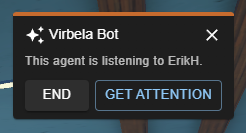
When a user is close enough to interact with a bot, a button appears above its head to start a conversation. The bot will listen through the user’s microphone and respond in real time.
A few key interaction features include:
- Bots focus on one user at a time to ensure a smooth conversation.
- When the bot is listening to you, it will look directly at your avatar.
- If someone else is currently interacting with the bot, you can request its attention.
- Conversations can be ended by clicking End or simply walking away.
Currently, bot behavior prompts are configured with the help of the Virbela team to ensure optimal results.
This capability is especially powerful for organizations looking to deliver immersive AI-driven simulations or role-playing exercises directly inside their virtual worlds.
Smarter AI Coach Conversations Within Simulations
We’ve also made several improvements to how AI coaches behave during simulations.
AI coaches will now:
- Stay focused on the user who initiated the interaction
- Bring sessions to a natural conversational close
- Transition more smoothly into feedback when appropriate
These updates make AI-powered simulations feel more natural and intuitive, especially when multiple users are present in the same room.
Enhanced Image Boards for Richer Content
Image Boards continue to evolve into powerful interactive content tools.
With this release, they now support video playback directly inside the virtual world. If an image board links to a video, users can click it and watch the video as an overlay without leaving the experience.
Supported formats include:
- YouTube
- Vimeo
- HLS and DASH streaming
- Most common video file formats
Additional improvements include:
Camera Focus Mode
Users can now click an image board to zoom in for a closer look. This makes it much easier to view detailed diagrams, presentations, or infographics.
To exit focus mode, users can simply:
- Click the board again
- Close the focus indicator
- Press the Escape key
This feature can also be toggled on or off when configuring the board.
Action-Based Interaction
Clicking an image board now reveals available actions such as:
- Focus: Camera zooms into board
- Maximize: Overlaid, close up view of the image
- Launch Link: Open the associated webpage
- Play: Watch an embedded video
- Edit: Modify the board configuration (for users with permissions)
These updates make it easier to create interactive content hubs inside virtual spaces.
Navigate Worlds with Internal Links
Image boards can now link directly to locations inside the same world.
When users click these links, they instantly jump to the referenced room or destination. This makes it easier to create guided pathways through large virtual campuses or interactive learning environments.
Easier Board Editing
Editing boards is now faster and more intuitive.
Edit Mode has been retired, and users can simply left-click an Image Board or Text Board to edit it (if they have permission). This removes extra steps and makes content updates quicker for world builders.
New Room Insights for Administrators
Leaders and administrators can now view Room Info from the admin tools.
This includes the Private Space ID, which can be used to pull detailed activity data in the Private Volume Attendance Report within app.virbela.com.
This feature provides greater visibility into how private spaces are being used across a campus.
Performance Improvements
Several updates in this release improve reliability and performance.
Notably:
- Screen sharing performance has been significantly improved, especially when sharing video.
- Fixes were implemented to prevent errors caused by password managers during login.
- Camera issues when avatars were seated have been resolved.
Account-Specific Simulations
This release also introduces improvements that expand how organizations can implement training in their Virbela environments. Account-specific simulations can be tied to specific worlds instead of being limited to Open Campus.
These capabilities make it easier to create immersive experiences tailored to your organization.
Looking Ahead
The addition of AI Agent Bots represents an important step forward for interactive virtual environments.
By combining immersive spaces with conversational AI, organizations can deliver dynamic training simulations, guided experiences, and intelligent virtual assistants directly inside their worlds.
We’re excited to see how customers begin using these capabilities to create the next generation of immersive learning and collaboration.
If you'd like to explore how AI simulations and immersive environments can support your organization, reach out to the Virbela team to learn more.
.png)


